 BuyerClear
How to verify cosmetology licenses for Shopify wholesale buyers
Check the exact license class, number and issuing authority against official evidence, compare the holder and expiry, then have a staff member decide whether to grant trade access. Finding a matching license does not establish that the applicant holds it.
By BuyerClear · Reviewed
Product guidance. Confirm your installed version, Shopify plan and exact license class before inviting buyers.
Start with the license class, not just the state
A cosmetology license, an esthetics license and a salon establishment license can describe different credentials. Ask for the class and issuing authority exactly as printed. A source configured for one class must not stand in for another.
Collect the state, exact license number including leading zeroes, holder name and expiry, along with the buyer’s business and contact details. Check the current class-and-authority directory before promising an automatic check. An unlisted class needs a manual official check.
In BuyerClear, a professional application can use a supporting image or PDF, or the shop can make that file optional. A photo helps staff compare evidence, but a photo alone cannot establish that a document is authentic. See buyer form requirements.
A review workflow staff can repeat
- Confirm the scope. Match the submitted class and authority to the intended professional requirement. Clarify whether an individual or business credential is required by your store’s policy.
- Check the exact identifier. Use the configured registry result or the official source for that class and authority. State-level fallback links can cover different professions; confirm their scope first. A similar name or number is not a substitute for the submitted identifier.
- Compare the evidence. Review the holder, status, class and expiry. BuyerClear keeps the entered details, registry result and any document reading separate so differences remain visible.
- Resolve discrepancies. Ask for clarification when a number, holder or date differs. Read the original if the document extraction is incomplete. Missing values are not confirmations.
- Make a staff decision. Approve, decline or request more information from the review screen. A registry match never approves the application automatically.
What that comparison looks like
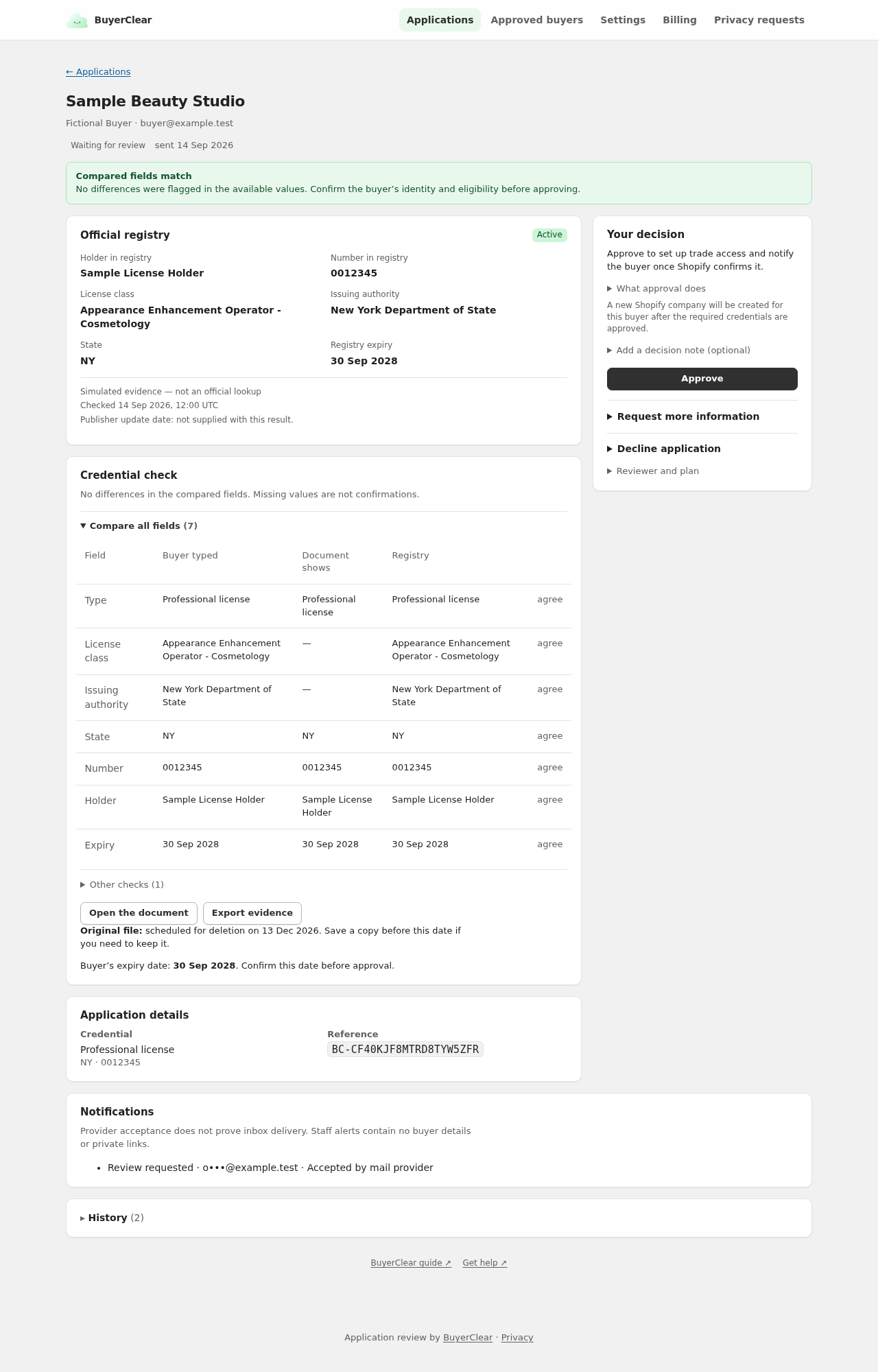
In this fictional example, a buyer submits a New York cosmetology credential. The sample result reports an active credential with the same number and expiry. The separate decision panel leaves the eligibility decision with staff. The sample number must not be used to query a real person.
An unavailable source is different from a missing license
- The source cannot answer
- Retry when appropriate or use the official lookup manually. A failed or stale source does not establish that the license is absent.
- The identifier was not found
- Confirm the typed number, class and authority. Investigate before treating the result as a reason to decline.
- The document and registry disagree
- Keep both versions in view. Ask the buyer to clarify; do not silently overwrite a submitted value.
The registry-outcome reference explains each result. The directory shows source configuration and freshness policy; it is not a guarantee that a source is available at this moment.
Approval is followed by a separate access check
BuyerClear starts the Shopify access steps after staff approval and marks access active only after Shopify confirms them. Your catalogs determine the products and prices the buyer can access. Follow the professional-only purchasing guide and plan for expiry and renewal.
A professional license never grants a resale tax exemption in BuyerClear. Professional access and the separate resale-certificate workflow have different purposes.